Indicator Reference

Contents
You can use a variety of indicators in a trading system. Trading Blox provides a long list of pre-built calculation methods that can be easily selected and used as either a standard indicator for display or use in a system, or as a value to a calculated or custom indicator you create for your requirements.
Built-in calculation methods used with Basic Indicators and Calculated Indicators can be used in scripts, and they can also be enabled to be plotted with the trading data.
Both of these types of indicators are pre-computed before a test simulation begins testing. Calculations performed for these indicators will use the first available record loaded and all the records in an instrument file to create a value for each instrument record so they are available ahead of testing.
Types of indicators: |
Description: |
|---|---|
Use a Selected built-in formula from the Indicator Wizard Dialog. |
|
Take an expression. These can only use pre-test start static data as they are computed pre test. |
|
that are computed during the test using the Update Indicators script. |
|
Extended Indicators |
Indicator Packs are provided as an add-on list of built-in indicator methods. Indicator Pack_1 is included with Trading Blox automatically. Calculation methods contained with an indicator pack will be included in alphabetical order in the same drop down list all the previous built-in calculation methods. Indicator Pack_1 methods can be used in the same way as all other indicators. |
First available load record available for pre-calculation processing is dependent upon the simulations established Start Date and the Preference setting established for "Years of Priming" field:
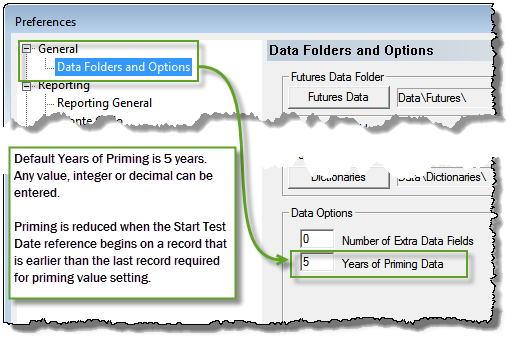
Once the available data of each instrument the indicator's selected built-in calculation will create a value for the entire length of the indicator.
1.To create a new Basic or Calculated indicator, click on the Indicator item in the lower left panel of the Blox Editor and hit New.
2.To create a Calculated Indicator, select the Calculated type from the type drop down box. You can then enter an expression in the Indicator Value Expression box.
3.To create a Custom Indicator, create an Auto-Indexed Instrument Permanent Variable of type Series. Then assign this value in the Update Indicators script.
Links: |
|---|
Basic Indicators, Calculated Indicators, Creating Indicators, Custom Indicators, Indicator Access, Indicator Reference |
See Also: |
Edit Time: 9/26/2020 1:34:25 PM |
Topic ID#: 340 |