Calculated Indicators

Contents
Calculated Indicators:
Calculated indicators are calculated in the Before Test script section runs. This is done so all the indicator values are available during the test. See Basic Indicators for more information on the other controls and options in this dialog.
To create a calculated indicator, select the Calculated type from the type drop down box. Use this to create a simple expression based on indicators, parameters, or values. An example for the channel top from the ATR Channel Breakout system is:
Example: |
|---|
closeAverageDays + ( channelWidth * averageTrueRange ) |
Test Computed Indicators: |
|---|
This property is computed dynamically during the simulation run and can be used in scripting as needed. This property cannot be used in Calculated Indicators because all values for all calculated indicators are computed before the simulation starts running, and this property has not been computed yet.
Test computed indicators do not support look-back references. However, their calculated result from each instrument bar can be stored in an IPV series that will support look-back referencing if that process is coded into the blox.
You can use indexes of other indicators, and the current value of indicators that are declared above this one. Please be careful, as the syntax checker cannot fully verify your expression. An illegal expression will cause your test to return unexpected results. |
You can access past values of other indicators, so to create an easy smoothing of the RSI:
Example: |
|---|
( rsiIndicator[1] + rsiIndicator[2] + rsiIndicator[3] ) / 3 |
Scripted Calculated example from the Turtle system:
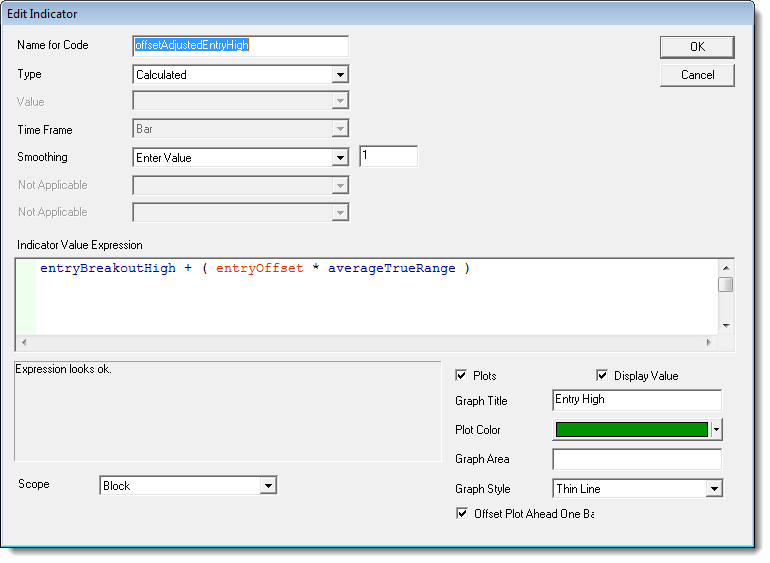
Valid items to use in the expression:
Parameters, other indicators, numbers, certain instrument properties that are available pre test.
To use another calculated indicator in the expression of a calculated indicator, be sure that the other indicator is listed first so that the value is updated for the bar prior to being used.
Instrument object properties that are static prior to the test start can be used. Dynamic instrument object properties cannot be used. No other objects can be used.
Links: |
|---|
Calculated Indicators, Creating Indicators, Custom Indicators, Indicator Access, Indicator Reference |
See Also: |
Edit Time: 9/26/2020 1:36:38 PM |
Topic ID#: 183 |