Walk Forward

Contents
Trading Blox version 5.x has integrated the Walk Forward Parameter rules so they are easier to execute. How that process works, and the steps a user can follow are listed in the linked areas of this table.
Walk Forward Information Sections: |
|
|---|---|
Walk Forward Testing Description: ^Top
The Walk Forward Test is a two-stage process that creates a series of data testing segments between the start and end dates selected in the Suite's Parameter date fields.
When a Walk Forward test runs, Trading Blox creates a groups of data segments. Each data segment is is determind by two of the three parameters displayed in the Walk Forward Parameters dialog. In the earlier data end of a Walk Forward segment, the size of the segment that is created by the Walk Forward Optimization Days parameter. The data section created by the number of days listed in the Walk Forward OOS parameter.
The optimal parameters values of the Walk Forward Parameters optimization process are determined by the statistical methods entered in the Walk Forward Goodness field. If the Walk Forward Goodness parameter field is left blank, the MAR statistic will be used to determine the optimal parameter values to test on the OOS section of a segment.
At the completion of the stepped parameter test in the optimizing segment, Trading Blox will apply the optimal parameter values using a normal single test to determine how the optimal parameters perform on the unseen Out of Sample data section of the tested segment.
Rolling Walk Forward Testing: ^Top
This next chart shows arrows the make up the two sections of each data segment used by the Walk-Forward testing process. Yellow arrows point toward the left side of the image show the data range section used for parameter optimization. Green arrows pointing toward the right side of the image are the Out of Sample (OOS) data portion used to validate the optimal parameters.
The logic behind this type of testing is based on the concept that optimal parameters should be developed on historical data, but not accepted for trading until they prove themselves on unseen data.

Walk-Forward Step Process Example
Unseen data can be any instrument's data that is large enough to provide a lot of record variations on which to develop a reliable measure of performance during the parameter optimization stage so it can perform reasonably close to the same performance on an additional large number of unseen record variations. Another way to test a system with OOS instrument records is to run the system after development off-line to see how it performs over the next year or more of time in paper-trading mode.
Walk Forward Simulation Example: |
Walk Forward Suite Selection: ^Top
Walk Forward testing can be performed with any suite name that has a system attached. The suite name doesn't need to be Walk Forward it can be a different suite name. When a suite is using a different name, there must also be a system with the same name in order for the Walk Forward Stats 2 reporting blox to have a system in which it is enabled.
Our second step will be the same for all suite names. In this step we need to select a system. Any system that is test ready and has parameters that can step in value will work with Walk Forward optimization.

Any Suite name can be selected, but there must be a system name that matches the suite name when the Walk Forward Stats 2 blox statistical results are needed.
System Selection: ^Top
Our example testing suite name is Walk Forward. We will included the Walk Forward Stats 2 results in our testing example. This means we need a system that is named, Walk Forward so the statistical blox can report its result.

The default Donchian System will be this system we use to perform a Walk Forward Parameter Optimization test. Click the Donchian system that it shows that it is included in our Walk Forward Suite simulation. Our example test uses a Donchian system with the Donchian SmartFills - EntryExit blox as its entry exit order module.
Walk Forward Stepped Parameters: ^Top
Our example test will step the breakout entry and exit bar length values as the parameters to optimize. If you are using the same system, click on the Step option for the Entry and the Exit Breakout parameters. Enter the values shown for each parameter when their fields expand:

Donchian Entry Exit with Smart Fills Stepped Parameters
If you are using a different system, Enable the Step option for the two parameters shown in your system and select a range you wish to test.
Walk Forward Segment Settings: ^Top
First step is to establish the optimization and OOS data section lengths in the Suite's Walk Forward Parameter settings. This step is where the test in sample optimization data lengths and out of sample validation testing periods are established.

Global Parameter Walk Forward Method Control.
In the image above the Suite's Walk Forward Parameter field the optimization days/bars needs the first 1,825 records will be the in sample optimization period, and the next 365 instrument records will be out of sample (OOS) will be the parameter validation period. Each additional segment will adjust its starting period forward by the number of OOS days and repeat the test again so as to generate a new OOS performance record.
Note: |
|---|
Most instrument markets trade five days a week, and there are fifty-two weeks in a year in which there are often about eight holidays in each year that means there are about 252 trading days in a year. Using the above assumption, the optimization days value of 1,825 data records shown above will cover a time period of about 7.25 years. In the second parameter value of 365 days that creates an OOS sample Walk Forward time range of about1.45 years. To have four independent test segments, the number of records required for each segment is 8.7 years for each test segment. To have enough data range between dates, using the same parameter values requires (1,825 + (365 x 3) = 2,920 records, or about 11.6 years of data. |
Walk Forward Goodness Setting: ^Top
Set the goodness measure in the Walk Forward Goodness parameter. This can be any built-in statistic or custom statistic added with test.AddStatistic. The optimal run from the optimization runs is determined by the maximum goodness value.
In our Walk Forward test example will will use the MAR statistic as the basis for selecting the best parameter values.
Statistical Measure Selections: ^Top |
|---|
If you wish to use a different statistical measure, then change the determined index number before clicking OK.
The logic of the Walk Forward optimization process is designed to select a statistical measure's highest value. While that is how Walk Forward will return results, it is possible with some statistical measures to select the peak where the values on each side of a peak are significantly lower. Selecting the pinnacle value is a measure that shows a lot of volatility might not work out well because it is unlikely the selected parameters will perform as well during variations.
Graphs of the statistical measure show the measure's volatility when displayed. If the measure it volatile, consider a different statistical measure or consider changes to the logic so its performance can be from the top of a more flattened curve with gentle slopes. |
Walk Forward Start and End Dates: ^Top
Check the date range set for the Walk Forward simulation. Walk Forward will perform will all three of the date selection options, but if you wish to control how many segments, or want only one, then use the date information Walk Forward Segment Settings to help you establish how this Walk Forward test is performed.

Our Walk Forward example will use the Walk Forward Stats 2 blox in the system name: Walk Forward.
Controlling Stops: |
|---|
Saving of open positions from one OOS test to the next has limitation because any variables that might be tracking trailing stops in any manner are not brought over to the next testing segment. |
Walk Forward Testing Threads: ^Top |
|---|
Each thread in a stepped simulation sets up a entire copy of the systems, blocks, objects, and variables, and runs the before and after simulation scripts for processing. You can access the parameter test number, and the thread index, to control the scripting as needed. The threads are run simultaneously, and in no particular order, so you can't share values between threads as you don't know which parameter test is running first or second within a thread group. Print out the parameter test number and thread index for a large test to see what I mean.
The way to save global values is either in the registry (for single values) or a file (for arrays). Take a look at the Walk Forward Stats 2 blox for an example of saving the stitched equity curve. In this case the out of sample runs (test.walkForwardStatus=2) do not execute at the same time, so we can output the equity values in order. If you are exporting values from regular test runs, keep in mind they can be out of order (test 4 running before test 1). You may run into conflicts attempting to write to the file from multiple threads at the same time, so the work around to that in the past has been to write to a different file for each thread, and then stitch them back together in the correct order in the After Test script section. |
Walk Forward Statistics Reporter: ^Top
Adding the Walk Forward Stats 2 blox statistical information to a Walk Forward test is similar to how others blox are added to a system, but there is one exception. To get started, enter the System Editor using the menu or by pressing F3:

In the left column near the bottom is the Global System name, Walk Forward, created for this testing example. Click on that system name. If the Walk Forward Stats 2 blox is not attached, follow the next steps to add it.
This Walk Forward Stats 2 blox is Installed when Trading Blox is installed. It is designed to report statistical and graphic results created during a Walk-Forward Parameter Optimization simulation.

To include this additional statistical module it must be attached to a system with the same name as the Walk Forward testing suite. Any system that has the same name as a Suite, Trading Blox designates that system as a Global System. This statistical module will only work with a Global Suite. When it is included in a Walk Forward test the Walk Forward Stats 2 statistical results will be included in the Stepped Parameter Test Summary Report, and the .
To find the Walk Forward Stats 2, open the System Editor and locate the blox name. Blox is designated as an Auxiliary blox. When the blox is found right click to bring up the pop-up menu, and then click on the Add option:

Add Walk Forward Stats 2 to Global Suite
When the add operation is complete the blox name will appear in the Auxiliary section of the System Editor.

Walk Forward Stats 2 Blox is Added as an Auxiliary blox
Walk Forward Stats 2 Global System Only Blox: ^Top |
|---|
If you created a different Suite name to use with your system and want to see the Walk Forward Stats 2 blox results, Do Not allow the Walk Forward Stats 2 blox to be attached to a standard simulation system as the blox' internal error checking will cause Trading Blox to halt with an error and report the blox is attached in the wrong place. When Walk Forward Stats 2 is needed, attach it to a global system name that is the same as the selected test suite name. |
Walk Forward Simulation Test: ^Top
Go to the Home main menu and in the Run Simulation section click on the Walk Forward button to begin the Walk Forward simulation test:

Stepped Parameter Test Summary Report: ^Top
This table shows Summary Performance result from a simple Walk Forward Simulation example using the values shown here:

Walk-Forward Stats Performance Summary Example
The above image performance table shows each parameter step section for each of the six simulation steps performed. Each step in the test will also shows a Stepped Parameter Summary Test report for each of the stepped periods that will appear when any of the numbered test rows are clicked with the mouse.
Walk Forward Stats 2 Graph Results: ^Top
Walk Forward Stats 2 blox attached to the Global System does not have any parameters, how it will display three graphs of how each of the stepped test performed. Each of the three graph examples shown here will appear in each of the stepped performance section shown in the Stepped Performance Summary Report heading area shown above:

Walk Forward Stats 2 Performance Curve Log Scale
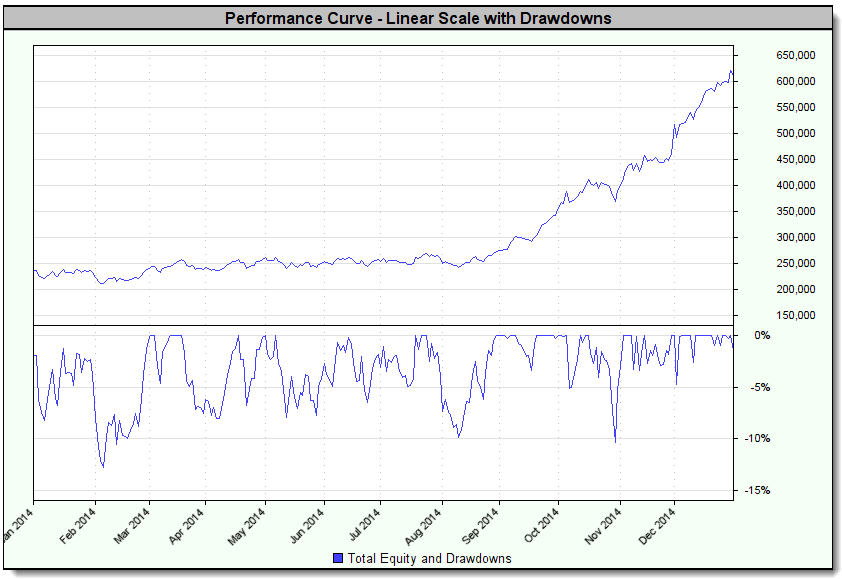
Walk Forwad Stats 2 Performance Curve Linear Scalewith Drawdown

Walk Forward Stats 2 Cash
Walk Forward Stats 2 Testing Results: ^Top
When the Trading Blox Log Window is active, this additional information will be available in the Log Window display.

Walk Forward Stats 2 Log Window Test Report
Last Edit: 9/12/2020 |
Edit Time: 9/12/2020 9:50:00 AM |
Topic ID#: 234 |