Operating Overview

Contents
Supplied Suite:
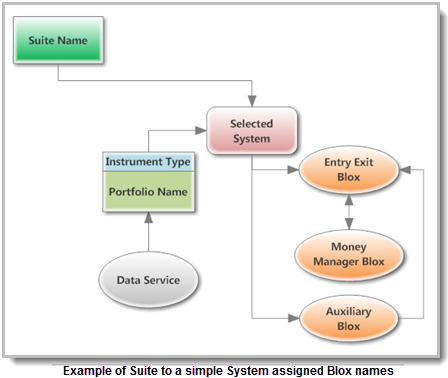
Trading Blox system construction begins when an existing suite is selected or a new suite is created. Suites can have one or more suites and they can also have their own Blox. Suites are the foundation component that allows systems to be tested. Suites can have a single system, or it can have multiple system. When multiple systems are attached to a suite each system will be tested in the order in which the system was selected to be in the suite.
Example shown above is a simple outline of the basic components that can be part of a system listing.
Installed Trading Systems:
System Operation: Trading Blox installs several well-known trading systems that allow various trading ideas to be tested. Each supplied system can be used as installed, or it can be changed and adjusted as needed. For example, each system's default parameters can be changed, or other Blox methods can be added or changed. Parameter values can be automatically changed when the Step option is made available near the parameter's entry field, or in the drop-down list. When Step is enabled the user can enter a starting and ending value and a value of how much to change on each step.
Once a particular combination of parameter values has been tested and found to produce acceptable results that system can be traded so the orders it generates can be used with a broker. Orders are generated when "Generate Orders" button on the main screen is clicked, or when the F7 key is pressed. With the click of the mouse, Trading Blox will generate a report of the current active positions and the next day's orders.
If any of a system's input parameters are changed those changed values will appear the next time that system is selected. Value that appear at the time of a test are the values used to control how the system operates. However, some of these parameters have nothing to do with the system's design rules. For example, the test start and end date values entered, or the list of markets in the selected portfolio. Most other menu displayed parameters affect how the system works, such as the number of days used to calculate a moving average. Global parameters can effect a system performance result. For example, commission and slippage can reduce the profits and increase trading cost. Margin limits can limit how many trades are allowed, and amount of equity available can cause some orders to be rejected. Global parameters are saved with the Suite file name when a different suite name is selected or your exit the software.
At Trading Blox, we understand that any trading system is only as good as the consistency with which it is applied. By harnessing the speed and reliability of modern-day computer hardware, Trading Blox significantly reduces the effort required to test and to trade a system, while eliminating the possibility of human error and missed trades. And therein lies its greatest strength: Trading Blox makes it easier to follow the trading systems you develop. At the heart of Trading Blox ability to help you build a successful trading strategy is its ability to test a large portfolio of instrument in a single test.
|