Properties:
|
Description:
|
abortTestPending
|
Returns true when the Abort Test or Abort Simulation functions have been used.
|
baseCurrency
|
Returns the ISO code of the system wide base currency
|
baseCurrencyBorrowRate
|
Borrow rate of the system wide base currency
|
baseCurrencyLendRate
|
Lend rate of the system wide base currency
|
capitalAddsDrawsTotal
|
Total capital adds and draws to date, from the capital adds draws file.
|
currentDate
|
Current simulation date. In YYYYMMDD format.
|
currentDay
|
Number count of the current day. Count starts at one on the day of the Test Start. Also used as the Test Bar when using Intraday Data, so this can be the "Test Bar Number" when using date and time.
|
currentParameterTest
|
Number of the current active parameter step test
|
currentTime
|
Current simulation time. In HHMM format.
|
feesIncentiveAccrued
|
Incentive fees accrued but not yet booked.
Note:
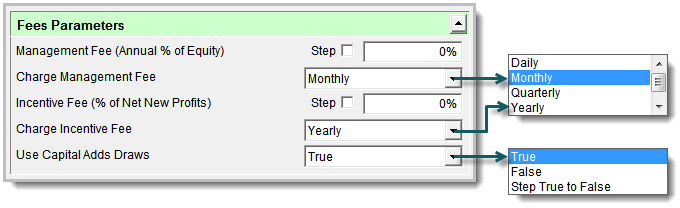
Fee transactions are accrued on a (daily/monthly/quarterly/yearly) basis, and booked as defined in global parameters .
 | | Click to Expand -- Click to Reduce |
|
feesIncentiveTotal
|
Total incentive fees booked to date.
|
feesManagementAccrued
|
Management fees accrued but not yet booked.
Note:
Fee transactions are accrued on a (daily/monthly/quarterly/yearly) basis, and booked as defined in global parameters .
| | Click to Expand -- Click to Reduce |
|
feesManagementTotal
|
Total management fees booked to date.
|
forexDataPath
|
Provides the full path to the Forex Files. Default Forex path: C:\Trading Blox\Data\Forex\
|
futuresDataPath
|
Provides the full path to the Futures Files. Default Forex path: C:\Trading Blox\Data\Futures\
|
instrumentCount
|
Total number of instruments being tested across all systems. This includes forex conversion files and if systems are using different portfolio types, could include stocks, futures, and forex markets. Does not include markets loaded using the LoadSymbol function.
|
instrumentList[]
|
List of all instruments in all the system portfolios, including the Forex conversion files. Indexed from 1 to InstrumentCount. Returns the full symbol, such as F:CL or S:IBM.
|
leverage
|
Leverage as set in Global Parameters
|
name
|
Name of the Current Test Suite.
|
orderGenerationBar
|
Returns true if the current bar is after the test end record, and therefore the order generation bar.
|
orderGenerationTest
|
Returns true if the test is generating orders, rather than just running a performance test.
|
orderReportPath
|
Full path of the current order report
|
primeStart
|
Earliest date for all loaded data for any instrument
|
resultsReportPath
|
Path of the results folder for this test. Used to access charts and graphs in the test results folder for display.
|
smartFillExit
|
Returns a True or False value of the Global Parameter option "Smart Fill Exit" setting.
|
stockDataPath
|
Provides the full path to the Stock Files. Default Forex path: C:\Trading Blox\Data\Stocks\
|
summaryResultsPath
|
Full path of the current test results saved file location.
|
systemCount
|
Number of systems to be tested.
|
testEnd
|
Test End date. The user entered end date, or the end of data, which ever comes first.
|
testStart
|
Test Start date. The first trading day equal to, or after the user entered start date, or the start of data, which ever is later.
|
threadCount
|
Number of active threads available in this Simulation test.
|
threadIndex
|
Active thread index of this simulation test. Each thread index up to ThreadCount will run concurrently, so if variables, or information needs to be passed from one thread to another, make sure the ThreadIndex is a match.
|
timeIncrement
|
Returns the TimeIncrement used for the test loop when using Intraday data. Output format is HHMM (Hour-Minute) order.
|
timeStamp
|
Start Time stamp of this test. Used to access charts, graphs, and other results for the test run.
|
totalParameterTests
|
Total number of distinct parameter tests
|
walkForwardStatus
|
Returns 0 for a normal test, 1 for the optimization portion of the walk forward test, and 2 for the out of sample portion of the walk forward test.
|